
How to turn a rough idea into a navigable prototype
A practical process for turning a rough idea into a clear problem, focused scope, main flow, and navigable prototype with thoughtful use of AI.
A navigable prototype does not start when the first screen appears. It starts when a vague idea is reduced to a problem, an audience, a small scope, and a flow that can be explored to generate learning.
Context
Almost every idea starts a bit messy. Sometimes it is a note on your phone. Sometimes it is a screen imagined out of nowhere. Sometimes it is just a feeling that a routine could be simpler if a small tool existed to organize it.
With AI and vibe coding tools, it has become very easy to jump straight from that note to an interface. You describe the idea, ask for a first version, and within minutes you have something that looks like a product starting to exist.
That is powerful. But it also creates a subtle trap: a polished screen can hide a confused hypothesis.
I have been trying to look at prototypes in a simpler way: not as a small version of a finished product, but as a way to make a hypothesis visible enough to be discussed, tested, and adjusted.
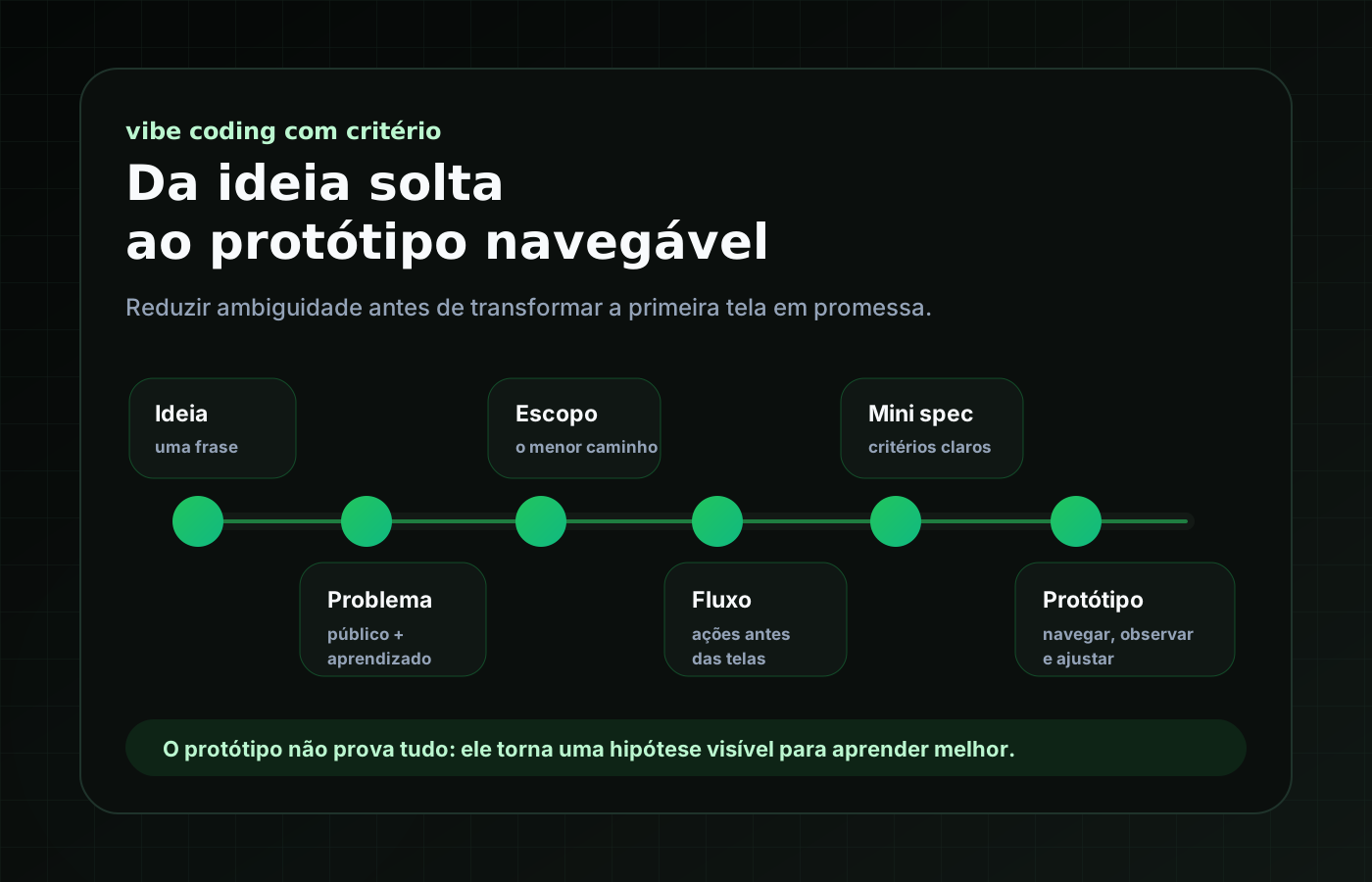
The main question
The question behind this process is: how can you turn a rough idea into a navigable prototype without pretending it has already become a validated product?
A navigable prototype can help you see whether the proposal is clear, whether the main flow makes sense, whether someone understands the next step, and whether there are obvious gaps in the experience. But it does not validate market demand, business model, security, technical feasibility, full accessibility, or production readiness by itself.
At this stage, the goal is smaller and more honest: organize the idea until it becomes an observable path.
- what problem am I trying to observe?
- who would this first version be useful for?
- what is the smallest path that needs to work?
- what do I expect to learn by navigating or showing this prototype?
- what stays out of this first version?
1. Capture the idea without solving everything
The first step is accepting that the idea may start incomplete. Instead of writing a huge specification, I start with a sentence, such as: “a space to organize what I am studying and decide the next step.”
At this point, I do not try to list every feature. I also do not choose technology, layout, or tooling. The sentence only captures the initial friction. It is raw material, not scope.
2. Translate the idea into problem, audience, and learning goal
After the sentence, I try to separate three things: observed problem, initial audience, and expected learning.
- problem: study notes are scattered and do not make it clear what to continue;
- initial audience: someone studying development on their own;
- learning goal: observe whether seeing topics and defining a next action makes it easier to resume studying.
This step helps avoid a common mistake: turning an idea into a feature list before understanding what it needs to clarify.
3. Cut the smallest useful scope
A navigable prototype gets better when the scope is small. In the example, the initial scope could be listing study topics, opening a topic, recording the next action, and confirming that it was saved or updated.
Out of scope items also need to be explicit: login, collaboration, notifications, advanced metrics, gamification, and integrations stay out of the first version. This boundary protects the idea from growing before the main path proves useful.
4. Write the flow before the screens
Before thinking about pages, I like to write the flow as a sequence of actions. The person enters, sees a list of topics, chooses one, understands its current state, defines the next action, receives a clear confirmation, and returns to the overview.
This kind of flow reveals questions that a list of screens does not show as clearly: what happens when there are no topics? How does the person understand which action is active? Can they go back without losing context? Do button labels make the outcome clear?
5. Turn decisions into a lightweight spec
The lightweight spec is the point where the idea stops being just a note and gains enough shape to guide implementation.
- prototype goal;
- initial audience;
- observed problem;
- learning goal;
- scope and out of scope;
- main flow;
- acceptance criteria.
This is not bureaucracy. It is a small agreement with the idea itself before asking AI or a tool to materialize anything.
6. Use AI to explore alternatives and build the first version
With the lightweight spec ready, AI tends to become much more useful. Instead of asking something generic like “create an app to organize my studies,” you can ask for a simple navigable flow, with a few screens, fake data, focus on clarity, and explicit scope limits.
- find ambiguous steps;
- suggest empty states;
- propose button labels;
- compare two possible flows;
- generate a first navigable implementation;
- review whether the scope was respected.
But the decision remains human. More options do not mean better decisions. Sometimes the best answer from AI is showing that the idea is still trying to solve too many things.
7. Navigate, observe, and adjust
After the first version exists, initial validation should match the maturity of the idea. I would observe basic things: does the person understand what it is for? Can they find the main path? Do they know what happened after each action? Does any text create confusion?
The findings go back to the lightweight spec or to a short decision list. The important thing is not to keep adding screens before understanding what the first navigation revealed.
A practical example
Let us use the initial idea: “a space to organize what I am studying and decide the next step.” An untreated version could quickly become a dashboard full of features: calendar, goals, login, charts, notifications, video integrations, ranking, and full history.
But for a first version, the question might be smaller: does seeing study topics and recording a next action make it easier to resume learning?
- an overview with fake study topics;
- a detail screen with short notes and a next action;
- a confirmation after updating that next action.
This example does not prove that the tool should become a product. It only helps visualize a hypothesis and observe whether the main path communicates something.
Lessons learned
- Rough ideas do not need long documentation, but they need a minimum amount of direction before the interface.
- A prototype becomes more useful when it starts from a clear question, not a feature list.
- Defining out of scope helps keep the first version small and honest.
- A well-written main flow reveals gaps that a polished screen can hide.
- AI works better when it receives context, limits, and acceptance criteria.
- The first version should prioritize navigation, clarity, and learning, not visual polish or final architecture.
Limits and caveats
This process does not replace user research, market validation, technical architecture, accessibility review, security, performance, or code quality.
It also does not turn any idea into a viable product. Sometimes organizing the idea shows that it is still too vague or that the problem is not as relevant as it first seemed.
A navigable prototype can create a false feeling of progress. When screens exist, the idea feels more mature. But maturity does not come from appearance alone. It comes from clarity about what is being tested, what was learned, and what still needs to be decided.
Conclusion
Turning a rough idea into a navigable prototype is not simply opening a tool and generating screens.
It is about reducing ambiguity step by step: capturing the idea, understanding the problem, choosing an initial audience, defining the learning goal, cutting the scope, writing the main flow, creating a lightweight spec, building a first navigable version, and observing what it reveals.
AI can speed up the materialization of this process a lot. But the person leading the idea is still responsible for deciding what needs to be tested.
A good prototype is not the one that looks the most complete. It is the one that helps you learn something concrete before investing too much energy in the wrong direction.