
When to automate and when to keep a process manual
Use practical criteria to choose between automation, assisted workflows, and manual work based on frequency, risk, maintenance, and process clarity.
Automation is not a goal by itself. The decision needs to account for process clarity, repetition, validation, risk, maintenance, and recovery.
When a task repeats, a developer's first reaction is often to imagine a script, an integration, or an automated workflow. I also like finding ways to reduce mechanical work, but repetition alone does not justify automation.
There is a difference between an annoying task and a process that is ready for automation. Sometimes the workflow still changes every week, depends on poorly understood exceptions, or requires a decision the system cannot validate on its own. Adding code too early can trade a few clicks for state, credentials, logs, silent failures, and future maintenance.
So before asking `how can I automate this?`, I prefer to start with another question: `is this process clear enough for automation to be simpler than the manual work?`
Automation is not the final destination of every process
A manual process is not necessarily a bad process. It may be the most economical way to handle a rare task, learn which rules truly matter, or preserve human judgment in a sensitive decision.
Likewise, automation is not good just because its happy path works. It needs to handle incomplete input, outages, duplicates, rule changes, and partial results. It also needs to make clear when it finished, when it failed, and what a person can do to recover.
Automation creates value when it reduces recurring friction without creating an operating cost larger than the original problem. That cost is not limited to implementation time.
- Setting up access and integrations.
- Running and monitoring the workflow.
- Recovering from failures and inconsistent data.
- Following changes in rules or tools.
- Documenting behavior and maintaining a recovery path.
To automate is to take ongoing responsibility for a small system.
First, understand the manual process
A confusing workflow does not become clear simply because it was turned into code. Automation often makes ambiguity more expensive because implicit decisions need to become executable rules.
Before implementing anything, I would observe several manual runs and record the trigger, required inputs, decisions, success criteria, exceptions, and recovery path when something fails.
- What starts the task?
- Which inputs are required?
- Which decisions happen along the way?
- How do we know the result is correct?
- Which exceptions appear?
- What can be repeated safely?
- How can work be recovered after a failure?
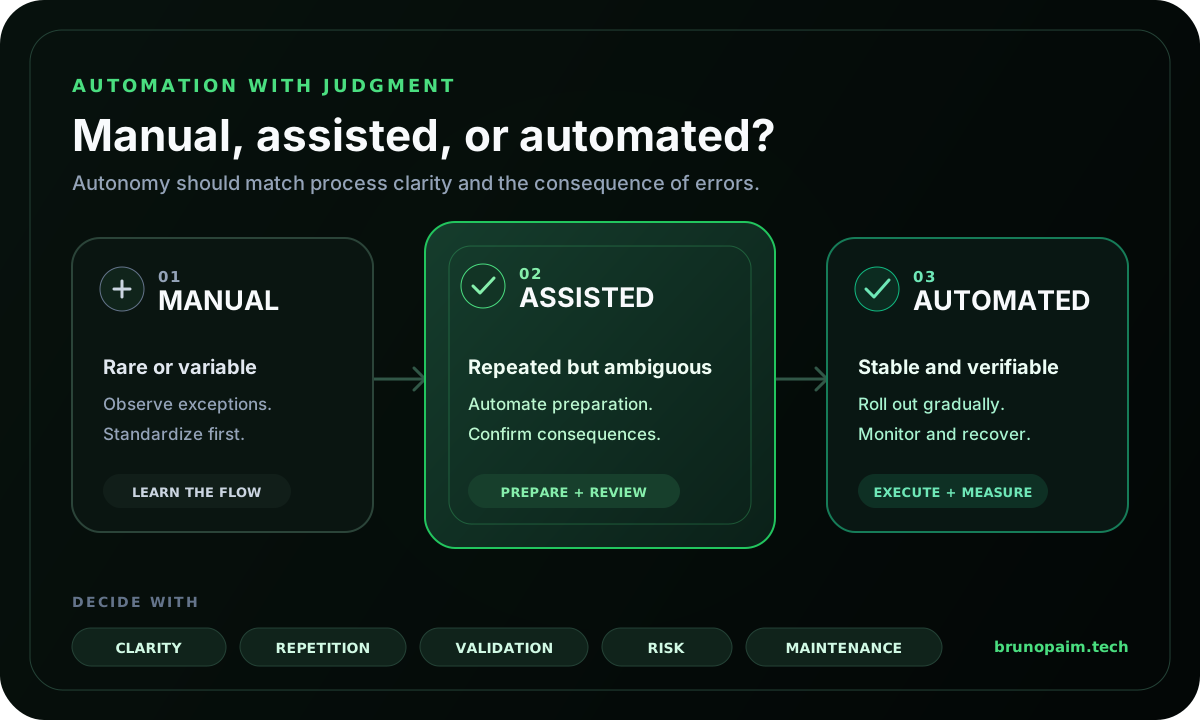
If the answers change on every run, the next step may be to create a checklist, standardize names, define a template, or separate common cases from exceptions. That preparation reduces variation and reveals which part deserves automation and which still depends on human context.
Signs that automation may be worthwhile
No single signal decides the path, but the combination below usually makes a stronger case:
- The task happens frequently and manual effort accumulates.
- Inputs and outputs are known.
- The rules are relatively stable.
- The result can be verified through objective criteria, comparison, a schema, or a test.
- Errors are detectable and do not depend only on someone noticing a problem silently.
- It is possible to retry, undo, correct, or route an exception to a person.
- Someone is responsible for monitoring and maintaining the workflow.
A recurring task that renames, validates, and organizes files can fit these criteria well. The rules are explicit, the result can be checked, and a run can preserve the original files until validation. Even then, I would start small, with a limited set of cases, clear logs, and a way to compare before and after.
Signs that keeping it manual may be better
- The task happens rarely and takes little time.
- The workflow is still changing or being discovered.
- Each run depends on different context.
- Exceptions are more common than the standard path.
- The cost of an error is high and the action is hard to reverse.
- There is no reliable way to validate the result.
- No one will be able to monitor or maintain the automation.
- The required integration is more fragile than the process itself.
Keeping a process manual can also be a temporary decision. That period helps gather examples, understand variations, and discover which parts truly repeat. Automating after observing the workflow usually produces more honest boundaries than starting from the tool.
There is a middle path
The decision does not need to be binary. Many tasks work better with assisted automation: the system prepares the work, while a person reviews or confirms the step with the greatest consequence.
- Fill in a draft from known data without sending it automatically.
- Validate fields and highlight inconsistencies while leaving correction to a person.
- Organize files in a preview before moving or deleting them.
- Suggest a classification and ask for confirmation in ambiguous cases.
- Generate a structured comparison without making the final decision.
This model concentrates automation on the repetitive part and preserves control where judgment, risk, or external consequences matter. Review needs to show enough information, highlight what changed, and allow corrections without starting over.
A five-question decision model
1. Is the process clear and stable?
If there is no well-understood sequence yet, standardize and observe before coding. Automation based on unstable rules accumulates patches quickly.
2. Does repetition justify a system?
Consider frequency, duration, volume, and concentration. A short task may be a good candidate when it happens many times, while a long annual task may still be simpler to perform manually.
3. Can the system validate the result?
The more objective the verification, the safer automation tends to be. When quality depends on interpretation, an assisted step may work better.
4. What is the consequence of being wrong?
Visible, reversible errors allow more autonomy. Publishing, sending, deleting, charging, or changing important data calls for controls proportional to the risk.
5. Who notices, recovers, and maintains it?
If no one receives the error, understands the state, or can retry safely, the workflow is not ready. Monitoring and recovery are part of the feature, not finishing touches.
Rare and variable: observe. Repeated and ambiguous: assist. Frequent, stable, and verifiable: automate gradually.
Three practical examples
Organizing a recurring batch of files
If names follow a rule, formats are known, and originals can be preserved, a script with a preview and a log can reduce repetitive work. The system should stop on invalid input and show what will change before finishing.
Reviewing text before publication
Tools can flag inconsistencies, suggest changes, or compare versions. Final approval remains useful because tone, context, and public consequences cannot be captured fully by an automated rule.
Consolidating data for a rare request
If files arrive in different formats and the rules still change, building a full integration may cost more than using a well-defined template. If volume grows, recorded manual runs provide better examples for future automation.
How to validate whether it is still worthwhile
Automation that made sense at first can lose value. The tool changes, volume drops, rules become more complex, or maintenance begins to take more time than the manual work did.
- How many runs actually happen.
- How much manual work remains before and after the workflow.
- Which failures and exceptions repeat.
- How much time is spent on maintenance and recovery.
- How many results require correction.
- Whether a manual path remains available when needed.
The goal is not to prove that automation was a good idea. It is to discover whether it remains the simplest and safest way to complete the task.
A checklist before automating
- Can I describe the process from beginning to end?
- Do I know which cases are standard and which are exceptions?
- Does the task repeat enough to justify maintenance?
- Do the rules change at an acceptable rate?
- Can the result be validated?
- Can the system detect and communicate failures?
- Is there a safe retry, undo, or recovery path?
- Does the action require human confirmation?
- Is someone responsible for monitoring and updating the workflow?
- Would a smaller solution, such as a template or checklist, already solve the problem?
Limitations and caveats
There is no universal frequency at which every task should be automated. Complexity, risk, tools, team, and context all change the decision.
The decision also cannot be based only on time saved per run. Fast automation may create rework, hard-to-notice failures, or dependence on an unstable integration. The criterion needs to consider the whole system and be revisited with real usage data.
Conclusion
Good automation starts before the code. It starts by understanding the task, reducing ambiguity, and deciding which level of autonomy fits its frequency, variability, and risk.
In some cases, the best path will automate almost everything. In others, it will prepare a preview and ask for confirmation. And there will be tasks where a clear manual process remains the simplest solution.
The main lesson is not to confuse technical motion with value. Good automation solves a recurring problem and remains understandable when something goes wrong.