
A practical guide to agents with tools
Learn when agents with tools make sense in AI apps and which limits, permissions, and validations help use this pattern with better judgment.
Agents with tools can be useful when an AI system needs to consult external context, decide the next step, or execute a limited action. The value, however, is not in looking autonomous. It is in operating with scope, permission, confirmation, and traceability.
Context
In the latest guides in this series, the goal was to build a more practical foundation for thinking about AI applications: RAG for retrieving context, structured outputs for turning responses into data, evals for defining criteria, and harnesses for repeating tests.
The next question is inevitable: when does an AI system actually become an agent with tools?
That question matters because the term "agent" has become too broad. Sometimes it is used to describe a chatbot with a better prompt, a fixed workflow, a function call, or anything that looks a little more autonomous.
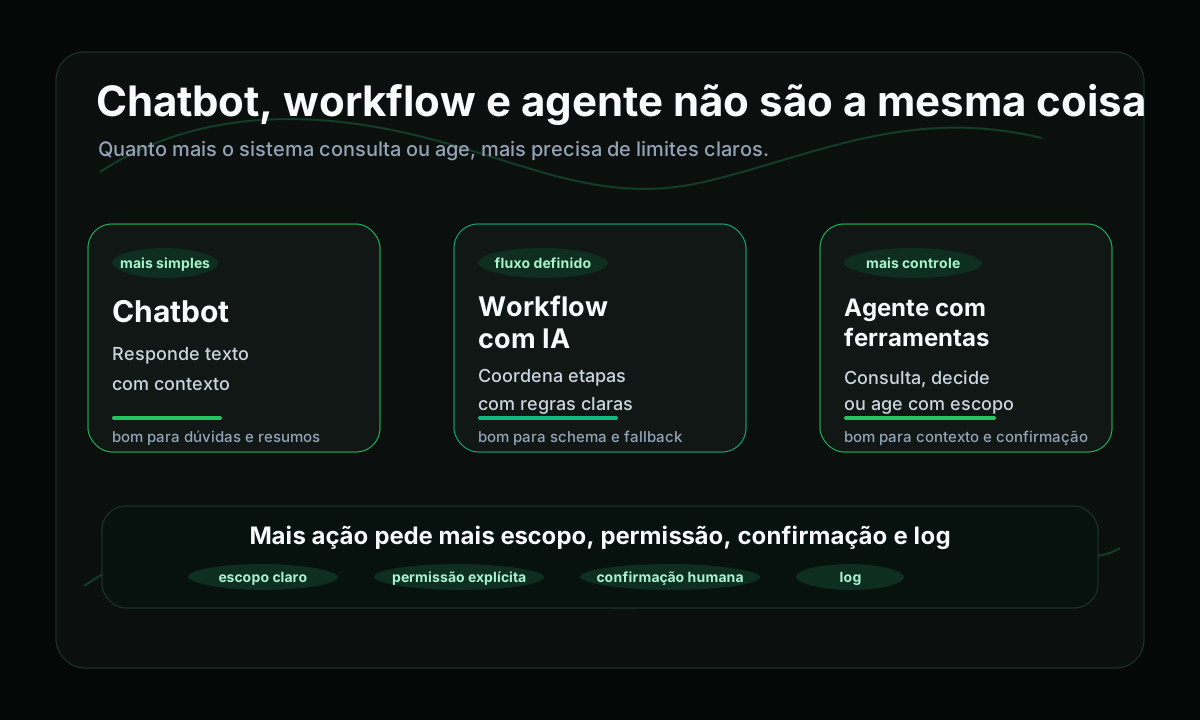
The problem
When everything becomes an agent, it gets harder to discuss architecture, risk, permission, and responsibility. A system that answers questions based on documentation does not carry the same risks as a system that consults user data and can open a ticket, send a message, or trigger a real-world tool.
The central question in this guide is simple: how do you identify when a chatbot truly becomes an agent with tools, and which guardrails need to exist so this does not turn into unnecessary complexity or risk?
Mental model
1chatbot2 -> answers34AI workflow5 -> answers inside a defined flow67agent with tools8 -> consults, decides, or acts within a limited scopeThe chatbot receives an input and returns an answer. The AI workflow may have steps and validations, but the main sequence remains predefined. An agent with tools appears when the system needs to use external capabilities to advance a task.
- consult a knowledge base or documentation;
- read the current state of a system;
- call a function;
- choose the next step based on context;
- execute a limited action;
- request confirmation before acting.
An agent with tools is not simply "a model with more freedom". It is a system that combines the model, context, tools, and controls.
Not every tool call is an agent
Seeing a function call is not enough to conclude that the system became an agent. Tool calling is useful, but by itself it does not answer which objective will be fulfilled, which tools can be used, in what order, under which restrictions, and with what permission level.
- Which objective is the system trying to fulfill?
- Which tools can it use?
- When does it need human confirmation?
- How will execution be recorded?
- How will failure be handled?
When it makes sense to use one
Agents with tools start making sense when the system needs to go beyond returning text and combine interpretation with controlled consultation or action.
- consult documentation and synthesize the most appropriate answer;
- fetch the current state of a system before guiding the user;
- choose between different tools depending on context;
- prepare a draft or open a ticket with confirmation;
- coordinate a flow in which the next step depends on the previous result.
When to keep it simple
Many problems are better solved without an agent. If the rule is fixed, the output must follow a strict schema, or the action is too deterministic, a normal function, a workflow with clear rules, or a structured output may solve it better.
This distinction matters because an agent with tools tends to require more observability, more permission control, and more care around side effects. If the gain does not justify that, the solution may be too sophisticated for the problem.
Minimum components
1goal2 -> context3 -> tool selection4 -> permission5 -> execution6 -> log7 -> review or next stepThe goal defines what the system is trying to solve. Context gives a basis for the decision. Tool selection limits capabilities. Permission defines what can run automatically, what requires confirmation, and what must stay forbidden.
Permission and confirmation
Permission is one of the most important and most ignored parts. An agent with tools should not start with broad access just because the model "can decide".
11. can consult22. can suggest33. can actConsulting usually carries lower risk. Suggesting already influences human decisions. Acting is the most sensitive point, because there is a real side effect. In those cases, human confirmation is not a delay. It is part of the design.
Practical example
Imagine a fictional support feature for a SaaS platform. The user writes: "I cannot access the billing area. I also need a copy of the latest invoice. If this is not solved today, I will miss the payment."
A simple chatbot would return generic instructions. An AI workflow would classify the message. An agent with tools, however, could consult the billing documentation, verify the official invoice-copy flow, fetch the current account status through a limited tool, and ask for confirmation before opening a ticket.
1user input2 -> agent interprets intent3 -> tool consults documentation4 -> tool checks account state5 -> agent proposes next step6 -> human confirms7 -> system executes allowed actionThe value lies in combining interpretation with consultation and coordination. But the limits remain clear: specific tools, reduced scope, controlled side effects, and confirmation before acting.
What to validate in the tool layer
- Was the input sent to the tool validated?
- Can the agent call any tool or only an explicit set?
- Is there a scope limit by user, resource, or action?
- Does the tool return a clear error when something fails?
- Does the tool output go back into context clearly?
- Is there a risk of the tool exposing sensitive data unnecessarily?
Relationship to harnesses, evals, and observability
Agents with tools also need validation. Perhaps even more. The harness acts as the test bench. Evals act as the criteria. And observability matters once the system is running and you need to review tool selection, parameters, failures, and the final decision.
- Was the right tool chosen?
- Was the call made with the correct parameters?
- Did the agent request confirmation when it should?
- Did it avoid acting when context was missing?
- Did the flow record failure correctly?
- Did the final answer help the next step?
Lessons learned
- Not every LLM flow needs to become an agent.
- Tool calling alone does not solve architecture.
- An agent with tools makes more sense when it needs to consult, decide, or act within a limited scope.
- Tools require explicit permission, input validation, and traceability.
- Human confirmation is part of the design when there is a side effect.
- Simple workflows or deterministic integrations remain better in many cases.
- Harnesses, evals, and observability help treat an agent as a real system, not as a demo.
The best agent is not the most autonomous one. It is the one that operates within clear limits.