
How to integrate AI into a Full Stack application without building an improvised chatbot
How to structure an AI feature considering backend, frontend, queue, worker, validation, security, costs, and user experience.
Calling an AI API is simple. The real challenge starts when the feature needs to deal with cost, latency, errors, validation, security, persistence, and user experience inside a Full Stack application.
Context
Many AI integrations start in the most direct way possible: a call to a model API, a prompt, a response, and a screen showing the result. For a prototype, that may be enough.
But when the idea needs to become part of a real application, the conversation changes. An AI feature can take time, fail, cost more than expected, return something in the wrong format, deal with sensitive data, and require human review.
The problem with a direct call
The problem with placing the model call directly in the controller or component is that responsibilities start mixing. The frontend knows too much about the provider, the backend builds prompts in the wrong place, the response is shown without validation, and changing models becomes scattered work.
It works in the beginning. Later, it charges interest.
A healthier separation
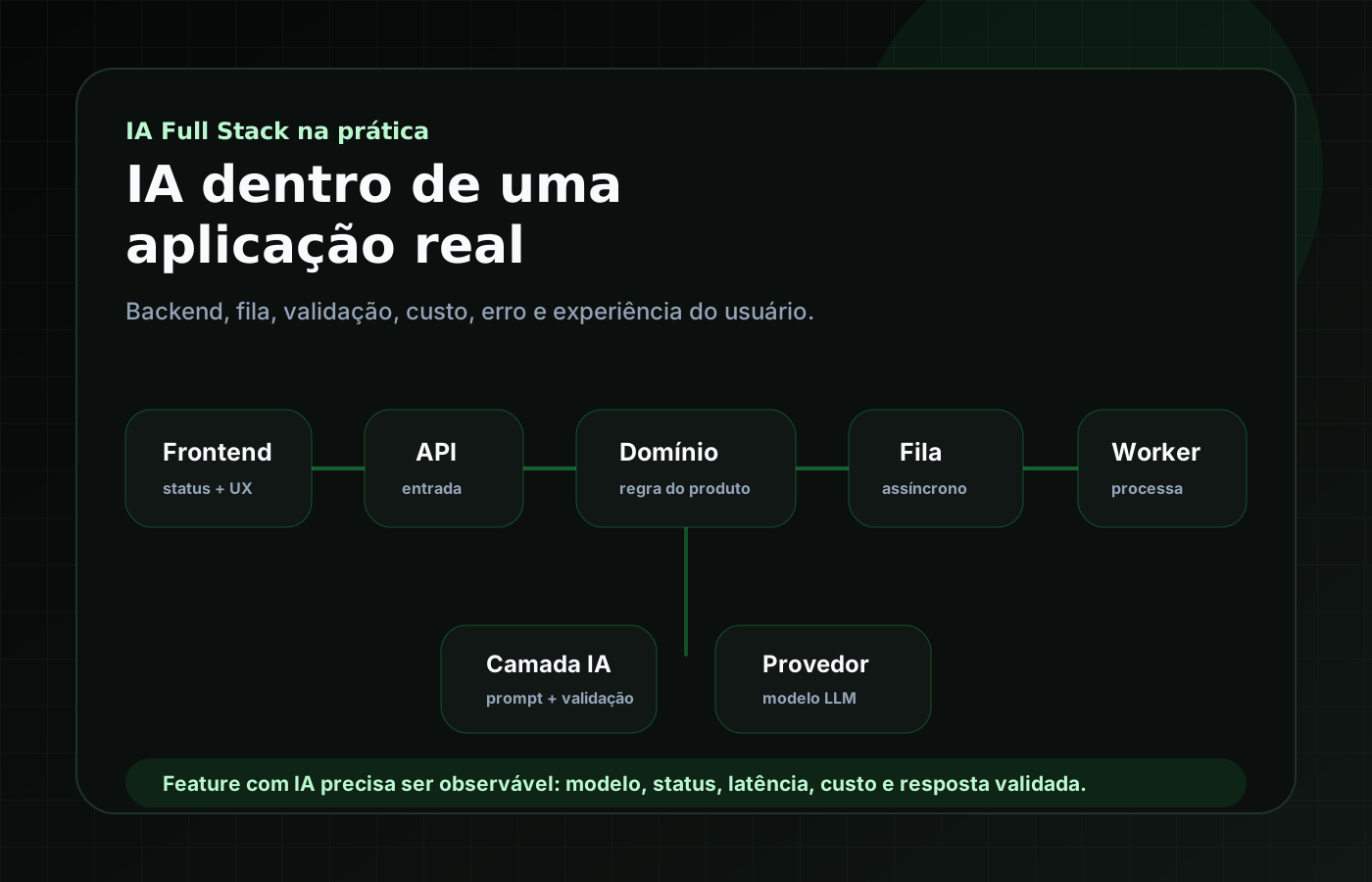
I like thinking about this flow in layers: frontend, API, domain service, AI layer, model provider, and records for logs, metrics, costs, and evaluations.
- The frontend shows status, error, result, and review.
- The API validates input and registers the request.
- The domain service understands the product rule.
- The AI layer builds context, selects a model, calls the provider, and validates the response.
- Logs and metrics record model, cost, latency, status, and failures.
When to use a queue and worker
If the task is slow, expensive, unstable, or needs reprocessing, a queue starts to make sense. The user starts the request, the API records a pending status, a worker processes the AI call, the response is validated, and the frontend follows the result.
- Request registered with status.
- Job sent to queue.
- Worker calls the AI layer.
- Response validated before saving.
- Frontend follows status, error, and result.
1type AIJobStatus =2 | 'pending'3 | 'processing'4 | 'completed'5 | 'failed'6 | 'cancelled';78type AIJob = {9 id: string;10 userId: string;11 feature: 'report_summary';12 status: AIJobStatus;13 provider?: 'openai' | 'anthropic' | 'google';14 model?: string;15 promptVersion: string;16 inputTokens?: number;17 outputTokens?: number;18 costEstimateCents?: number;19 latencyMs?: number;20 errorCode?: string;21 createdAt: string;22 updatedAt: string;23};What is worth recording
For an AI feature, I would record at least the task type, prompt version, provider, model, tokens when available, estimated cost, processing time, status, error, validated response, and human or automatic evaluation when available.
This helps understand the feature after it leaves the demo. Without this record, it is hard to know whether the problem is prompt, model, input data, latency, cost, or user experience.
Validate the response before saving
If the feature expects JSON, I prefer treating the model response as untrusted external data. It needs to go through a schema, like any important system input.
1import { z } from 'zod';23export const ReportSummarySchema = z.object({4 summary: z.string().min(80).max(1200),5 riskLevel: z.enum(['low', 'medium', 'high']),6 mainPoints: z.array(z.string().min(8)).min(3).max(7),7 confidence: z.number().min(0).max(1),8});910const parsed = ReportSummarySchema.safeParse(modelOutput);1112if (!parsed.success) {13 throw new InvalidAIResponseError(parsed.error);14}Timeout, retry, and fallback
Another thing that separates a demo from a real system is deciding how the application reacts when the provider is slow, refuses, is unavailable, or returns an invalid format.
1for (const attempt of [1, 2, 3]) {2 try {3 const output = await ai.generate(request, {4 timeoutMs: 20_000,5 idempotencyKey: job.id,6 });78 return validateAndPersist(output);9 } catch (error) {10 if (!isRetryable(error) || attempt === 3) break;11 await wait(exponentialBackoff(attempt));12 }13}1415const fallbackOutput = await ai.generate(request, {16 provider: 'secondary',17 timeoutMs: 20_000,18});1920return validateAndPersist(fallbackOutput);UX is also part of the architecture
When an AI feature takes time or fails, the interface needs to help. Clear status, retry, history, result editing, and human review indicators can be as important as the model call.
Conclusion
Integrating AI into a Full Stack application is not about placing a chatbot somewhere in the interface. It is about designing a flow that connects frontend, backend, data, errors, costs, validation, and user experience.