
A practical guide to harnesses for testing AI prompts, models, and workflows
Learn how to build a simple harness to test AI prompts, models, and workflows with cases, repeatable execution, logs, and version comparison.
A harness helps turn loose AI tests into repeatable execution. It does not guarantee quality by itself, but it lets you run the same cases, compare versions, record results, and notice regressions before relying only on the feeling that "it got better".
Context
In the last guides in this series, the idea was to move gradually through the structure of an AI feature.
First, RAG: when the application needs to retrieve external context before answering. Then chunking, embeddings, and retrieval: how to prepare and retrieve that context with more judgment.
Then structured outputs: when model output needs to become validatable data for the system. Then evals: how to define cases, criteria, and ways to compare whether a change really improved.
But a practical question remains: how do you run those tests in a repeatable way? This is where the harness comes in.
The name sounds more sophisticated than it needs to be. In this guide, a harness is simply an organized way to execute tests: take a set of cases, run a version of the prompt, model, or workflow, store the answers, and compare the results.
The problem
Testing AI manually is useful. When you are exploring a new prompt, it makes sense to open the chat, try examples, observe answers, and adjust the instruction.
The problem appears when that loose test becomes the only criterion: I changed the prompt, tested one input, the answer looked nice, it seemed better, so I approved the change.
That is fragile. Maybe that case improved, while another got worse. Maybe the answer is more polished, but less faithful to context. Maybe the new model respects the format and ignores an important rule.
- What exactly changed?
- Which cases were tested?
- Did the comparison use the same inputs?
- Did the previous version also pass this case?
- Was there a regression?
- Could someone repeat this test later?
Mental model
A simple way to think about a harness is to separate eval from execution. The eval answers what will be evaluated. The harness answers how that evaluation will be run repeatedly.
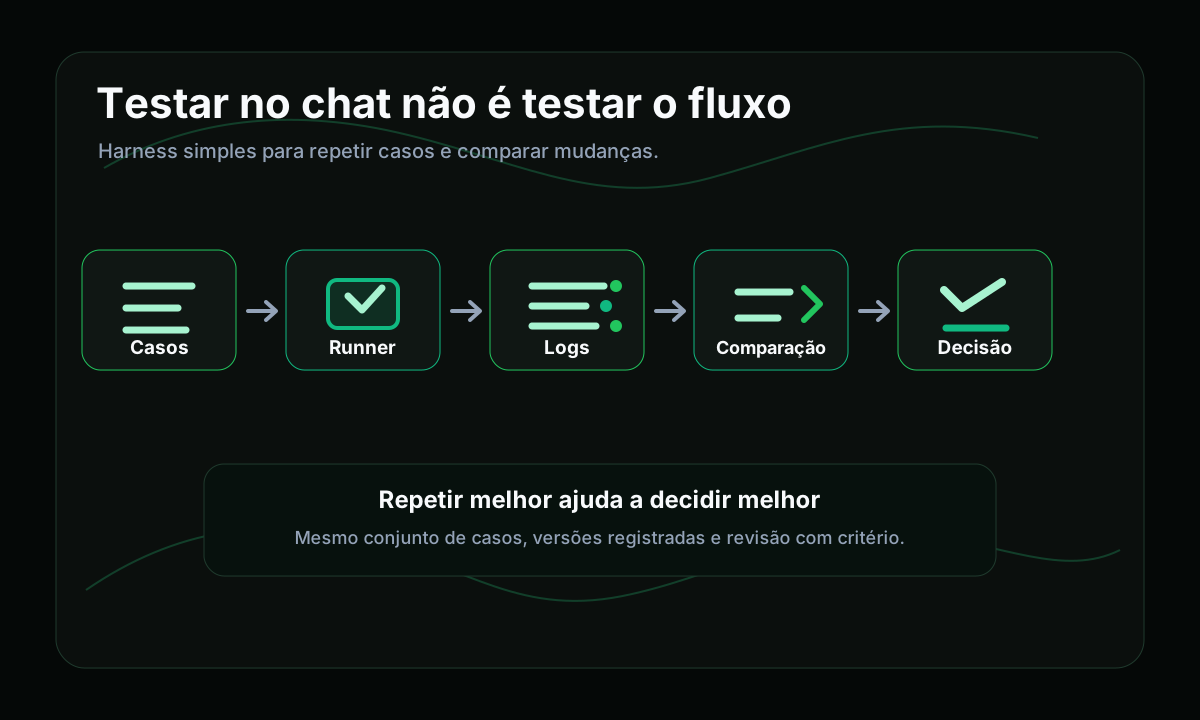
1test cases2 -> runner3 -> recorded answers4 -> version comparison5 -> decisionCases represent important situations for the feature. The runner executes those cases by calling the prompt, model, function, or workflow you want to evaluate. The recorded answers make it possible to compare what happened in each version.
Instead of "I tested it in chat and liked it", the question becomes: I ran the same cases on the new version and the previous version. What changed?
A harness is not a quality guarantee
A harness does not magically make AI reliable. It does not replace good criteria, human review, observability, or validation through real usage.
What it does is more modest and more useful: it creates a repeatable way to observe behavior. That already changes the conversation a lot.
- which input was used;
- which prompt version ran;
- which model answered;
- which parameters were active;
- which context was sent;
- which answer came back;
- which criterion passed or failed;
- which decision was made.
When to use a harness
Not every experiment needs a harness. If you are only studying an idea, exploring possibilities, or building a very early proof of concept, manual testing may be enough.
A harness starts to make more sense when a change needs to be compared with some care.
- Changing a prompt used in an important feature.
- Comparing two models for the same task.
- Adjusting chunking, retrieval, or context sent to the model.
- Testing structured output with a schema.
- Adding or changing fallback behavior.
- Evaluating automatic classification.
- Investigating a regression noticed by users.
- Preventing a fix from breaking cases that already worked.
How to start small
An initial harness can be very simple. Imagine a fictional feature that receives support messages and returns intent, priority, summary, suggested next action, and a human review flag.
1For each case:2 1. send the input to the current prompt version3 2. save the answer4 3. send the same input to the new version5 4. save the answer6 5. compare using the defined criteriaIn the first version, comparison can be manual. That is not a problem. The initial gain is running the same cases and recording the answers.
What to record
Logs are an important part of a harness. You do not need full observability at the start, but a few fields help a lot when something changes.
- Case: identifies which input was tested.
- Version: separates the tested prompt, model, or workflow.
- Model and parameters: record the configuration used.
- Context: indicates whether there was RAG or external data.
- Answer: allows later comparison.
- Error: records schema failure, timeout, or exception.
- Evaluation: marks passed, failed, or needs review.
- Note: preserves the reasoning behind the decision.
This avoids a common problem: noticing that an answer changed without knowing why. Maybe it was the prompt, the model, retrieval, temperature, or an activated fallback.
Practical example
Imagine two prompts for a fictional support triage feature. The goal is to improve urgency detection without marking everything as urgent.
1I cannot access my account since yesterday.2I tried to reset the password, but the email does not arrive.3I need to get in today because I have an important meeting.The expected criteria are: login intent, high priority, mention of the reset email failure, fast routing, and no invented technical cause.
1{2 "intent": "login",3 "priority": "medium",4 "summary": "The user has an account access problem.",5 "next_action": "Send password reset instructions.",6 "needs_human_review": false7}1{2 "intent": "login",3 "priority": "high",4 "summary": "The user cannot access the account and does not receive the password reset email. There is urgency because of a meeting on the same day.",5 "next_action": "Check password reset email delivery and route to human support if same-day access is needed.",6 "needs_human_review": true7}For this case, prompt-v2 seems better. But the harness does not stop here. It runs other cases to see whether the new version started marking simple billing issues as urgent, became too long, or requested human review unnecessarily.
One isolated answer shows one example. A harness shows behavior across several examples.
Version comparison
A harness becomes more useful when you control what you are comparing. If possible, change one thing at a time: prompt A versus prompt B, current model versus new model, old retrieval versus adjusted retrieval.
1Date: 2026-07-142Goal: compare prompt-v1 and prompt-v2 for support triage3Cases: 124Model: current application model5Parameters: temperature 0.26Main change: clearer instruction for urgency and human review7Result: prompt-v2 improved 5 cases, kept 4, worsened 38Decision: adjust prompt-v2 before approval9Note: the new version tends to mark billing as urgent too easilyThis kind of note preserves the reasoning. When someone reviews the change later, they do not need to guess why it was approved or rejected.
Regression is the main reason
One of the biggest uses of a harness is finding regression. In AI features, regression does not always look like an obvious bug.
- The JSON remains valid, but the content got worse.
- The summary became shorter, but lost an important detail.
- The answer is more polite, but less objective.
- The model follows the format better, but invents a justification.
- Retrieval brings less noise, but also loses useful context.
- The fallback appears more often than it should.
A manual harness also counts
There is a temptation to think a harness only counts if everything is automated. It does not need to be that way.
11. A spreadsheet has the test cases.22. A script generates answers for each case.33. Answers are saved by version.44. A person reviews the criteria and marks passed, failed, or needs review.55. The final decision is recorded.That is already much better than testing three examples from memory. Over time, some parts can be automated: validating JSON, checking required fields, checking allowed values, measuring cost and latency, or detecting parsing errors.
What to avoid
- Creating only overly easy cases.
- Measuring only what is easy to automate.
- Comparing versions with different inputs.
- Forgetting model, parameters, context, and system instructions.
- Treating a score as absolute truth.
Validating a schema is important, but an answer can pass the schema and still be poor. Format is part of quality, not the whole quality.
Relationship with observability
Harnesses and observability are not the same thing. A harness helps before or during controlled changes. Observability helps understand what happens when the feature is used for real.
The harness helps avoid approving changes in the dark. Observability helps avoid operating the feature in the dark. This is a natural bridge to the next guides in the series.
Limits and caveats
A harness helps, but it has limits. It depends on the quality of the cases, the clarity of the criteria, and human review when judgment is subjective.
It can create too much confidence if the test set is small, biased, or easy. It can also become bureaucracy if applied to every small experiment.
The first harness does not need to impress. It needs to help you decide.
Lessons learned
- Testing in chat helps, but it is not the same as testing an AI workflow.
- Evals define criteria; a harness executes cases in a repeatable way.
- An initial harness can be simple: cases, runner, logs, comparison, and decision.
- Using the same inputs is essential for comparing versions.
- Minimal logs help explain why an answer changed.
- Human review remains important, especially for subjective criteria.
- Automating repetitive parts makes sense, but only after understanding what needs to be evaluated.
Conclusion
A harness does not need to be large infrastructure. In practice, it begins when you stop testing a change with loose examples and start running the same cases with some record.
When prompt, model, retrieval, or fallback changes, the question stops being "did this answer seem better?" and becomes "running the same cases, what improved, what got worse, and what still needs review?".
It is not absolute certainty. It is repetition, comparison, and judgment. For AI features, that is already a huge step forward.