
Claude Opus 4.8: what dynamic workflows actually change
A practical look at Claude Opus 4.8, dynamic workflows in Claude Code, and what they may change for real AI-assisted development work.
Opus 4.8 is interesting not only because of model improvements, but because it points to workflows where large tasks can be planned, distributed, verified, and consolidated by agents.
Context
Anthropic announced Claude Opus 4.8 on May 28, 2026. According to the company, the new version builds on Opus 4.7 with improvements across benchmarks, collaboration, coding tasks, agents, and professional work.
This kind of release usually comes with numbers, comparisons, and strong claims about capability. That is part of the current cycle of AI tools. But for people using AI in development, the more useful question is not only "did the model get better?". It is "does this change anything in the real workflow?".
In the case of Opus 4.8, what caught my attention was the set of changes around the model:
- effort control in claude.ai and Claude Cowork;
- cheaper fast mode compared with previous models;
- a Messages API update that accepts system messages inside the messages array;
- improvements in judgment, collaboration, and honesty reported by Anthropic;
- dynamic workflows in research preview in Claude Code.
That last point is the most interesting one for this post.
Problem or question
Much of AI-assisted development still happens in a linear format: I describe a problem, the model responds, I review it, ask for adjustments, and keep iterating.
That flow works well for many things: explaining a concept, reviewing a function, improving copy, suggesting a structure, comparing approaches, or implementing a small change.
But some tasks do not fit a linear conversation that well. For example:
- reviewing patterns spread across a codebase;
- finding inconsistencies between files;
- planning a migration;
- auditing code with multiple verification points;
- comparing several solution hypotheses;
- validating whether a change affects documentation, tests, routes, and components.
In these cases, asking a single agent to "look at everything" may produce an answer that seems complete but is actually shallow. The model may cover part of the problem, skip checks, or mix real findings with weak assumptions.
The central question, then, is: do dynamic workflows change this limit in a practical way, or are they just another layer of complexity?
Process analyzed
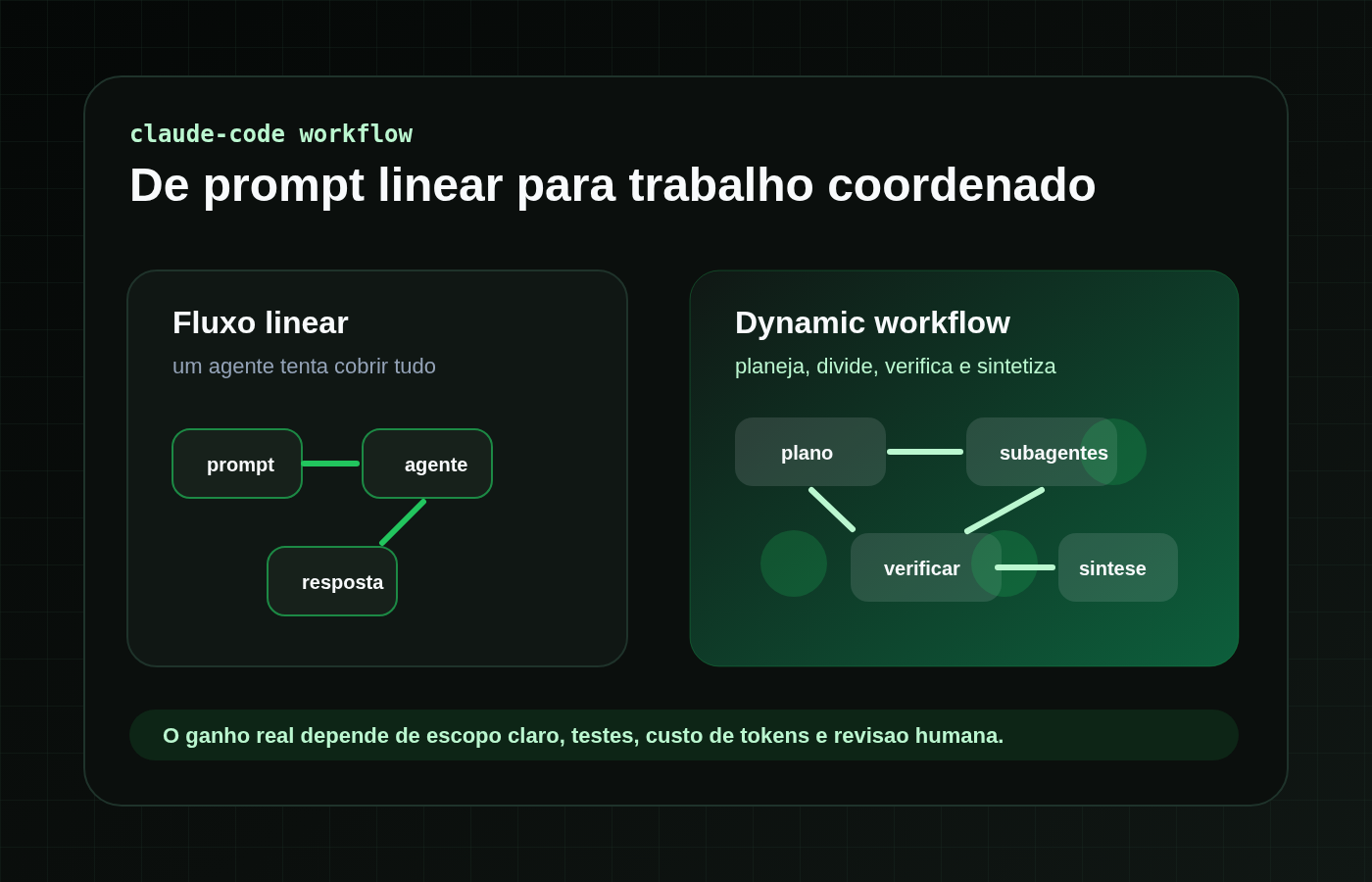
Based on Anthropic descriptions, dynamic workflows is a research preview feature in Claude Code that lets Claude plan a large task, split the work into subtasks, run subagents in parallel, verify results, and consolidate a final response.
Instead of one agent trying to solve everything in a single sequence, the idea is closer to this:
- understand the goal;
- plan investigation tracks;
- distribute parts of the task to subagents;
- run independent checks;
- compare results;
- consolidate a reviewable output;
- return it for human review.
That changes the type of task that may make sense to delegate to AI.
A single agent may be enough to review a small component. A workflow with subagents starts to make more sense when the problem is broad, parallelizable, and needs cross-checking.
Anthropic itself mentions use cases such as codebase bug hunts, audits, optimization work, large migrations, modernization, and critical work that needs to be checked more than once.
That is the relevant point: the potential gain is not only in "answering better", but in organizing the execution of large tasks more effectively.
Practical example
A safe way to think about the real impact would be a small audit in a personal project.
Map components, helpers, or files that seem unused, identify possible duplications, and suggest a cleanup order without changing anything yet.
In a linear flow, I could ask a single agent to do that. It would probably search files, infer relationships, and return a list.
In a dynamic workflow, the expectation would be different. Claude could split the task into tracks such as:
- checking components;
- checking helpers;
- checking imports;
- comparing routes and pages;
- looking for duplicated patterns;
- reviewing possible false positives;
- consolidating a final list with confidence levels.
The real impact would only appear in the comparison.
- How many findings were useful?
- How many were false positives?
- Did the output separate facts, hypotheses, and recommendations?
- Did the workflow verify its own findings?
- Was the result more actionable than the linear response?
- Did the token usage make sense for the value delivered?
- Could I turn the output into a small, reviewable change?
This test matters because dynamic workflows should not be treated as automatic quality. Parallelizing a poorly defined task only spreads confusion. The feature seems more promising when the problem has clear scope, criteria, and validations.
What actually changes
1. From response to coordinated execution
The model stops being only a response interface and starts acting more like a work coordinator.
That does not mean full autonomy. It means some tasks can be broken down and investigated with more structure before they reach the user.
This difference matters in development because many problems are not hard because of one technical decision. They are hard because they involve several parts of the project at the same time.
2. From trusting the first answer to verification
A single answer can look good even when it skipped an important part.
With workflows, at least in theory, there is more room for independent verification: agents trying to solve parts of the problem, other agents reviewing, challenging, or confirming the findings, and a final synthesis step.
That connects with an idea that already appears in other posts on this blog: AI helps more when there is a validation criterion. The work does not end when the answer arrives. It ends when the answer can be reviewed, tested, and explained.
3. From small tasks to larger-scope tasks
A linear chat works very well for small tasks. But a migration, audit, or codebase analysis may require more than a sequence of prompts.
Dynamic workflows point toward a use case that feels closer to "organizing a technical operation" than "asking for an answer".
That may be the most relevant impact for developers: not necessarily writing one function better, but helping investigate, plan, and validate changes that cross many parts of a project.
New features worth watching
Effort control
Anthropic now offers control over how much effort Claude puts into a task. At higher settings, Claude tends to spend more time and tokens to improve the response. At lower settings, the response can be faster and use fewer limits.
That is useful because not every task deserves the same level of reasoning. A simple question does not need the same effort as an architecture review or a long analysis.
Cheaper fast mode
According to Anthropic, Opus 4.8 fast mode runs faster and is cheaper compared with previous models. This can matter for cases where speed is more important than maximum effort.
Still, the choice between speed, quality, and cost depends on the type of task.
System messages during the task
The Messages API update allows system entries inside the messages array. In practice, this can help agent tools and harnesses update permissions, token budgets, or environment context during an execution.
This point is less visible for someone using only the interface, but it can be important for people building systems with agents.
Better honesty and judgment
Anthropic says Opus 4.8 is more likely to flag uncertainty and less likely to let flaws in code it wrote pass without warning. That kind of improvement is more interesting than it may look.
In development, an AI system that says "I am not confident about this" can be more useful than one that answers with false certainty. Especially when the work involves code, migration, analysis, or decisions that affect several parts of a project.
Lessons learned
- Opus 4.8 looks like an incremental model improvement, but dynamic workflows point to a bigger change in the working format.
- The real impact is less about "a better model" and more about tasks that can be planned, divided, verified, and consolidated.
- Dynamic workflows make more sense for broad, parallelizable problems with clear validation criteria.
- More AI autonomy requires more context, not less. Without scope, tests, and review, the workflow may only amplify noise.
- Token cost becomes part of the technical decision.
- A good way to evaluate the feature is to compare a linear workflow and a dynamic workflow on the same controlled task.
Limits and caveats
The first limit is usage cost. Claude dynamic workflows documentation warns that the feature can consume substantially more tokens than a normal session. That changes how it should be used.
If a task is small, a single agent may be enough. Using dynamic workflows for everything can become wasteful.
The second limit is scope. Larger workflows need better instructions. If the goal is vague, the result tends to become vague at a larger scale.
The third limit is validation. The fact that there are subagents and verification does not remove human review. The output may be better structured, but it still needs to be checked with tests, critical reading, and project context.
The fourth limit is access. The feature is in research preview and depends on plans, settings, and availability in Claude Code. That means the article should not treat the feature as universal for everyone using Claude.
Finally, there is the risk of hype. It is easy to turn dynamic workflows into a claim that is too large. The more mature use, to me, is the opposite: choose controlled tasks, measure what improved, observe the cost, and decide where the feature actually makes sense.
Conclusion
Claude Opus 4.8 feels interesting to me not only because it is a new model version, but because of the type of use it starts to normalize.
With dynamic workflows, the conversation moves away from only "do this task" and gets closer to "plan, divide, investigate, verify, and consolidate".
That may have real impact in development, especially for audits, migrations, larger reviews, and tasks that require cross-checking. But that impact still depends on something that has not changed: technical judgment.
More agentic AI does not reduce the need for documentation, scope, and validation. It does the opposite. The larger the workflow, the more important it becomes to know what to ask, how to measure the response, and when to say it is not ready yet.