Behind the scenes of building brunopaim.tech
A behind-the-scenes look at how I organized brunopaim.tech with Nuxt, Tailwind, a blog, AI First documentation, and criteria for evolving the project.
brunopaim.tech started as a place to organize digital presence, but it also became a lab for content, documentation, technical decisions, and careful AI use.
Context
When I started organizing brunopaim.tech, the idea was not to create a huge website.
The goal was to have my own space to centralize links, studies, projects, a blog, and behind-the-scenes notes about web development, AI, automation, digital tools, and digital products. A place that did not depend only on social platforms and could follow my evolution as a developer.
But in practice, a personal website stops being simple when it starts carrying more responsibility.
It needs to explain who I am, show what I have been studying, organize reusable content, preserve sensitive information, keep visual consistency, and still work well technically. A good-looking home page is not enough. The project needs direction.
That is when the site also became a process lab.
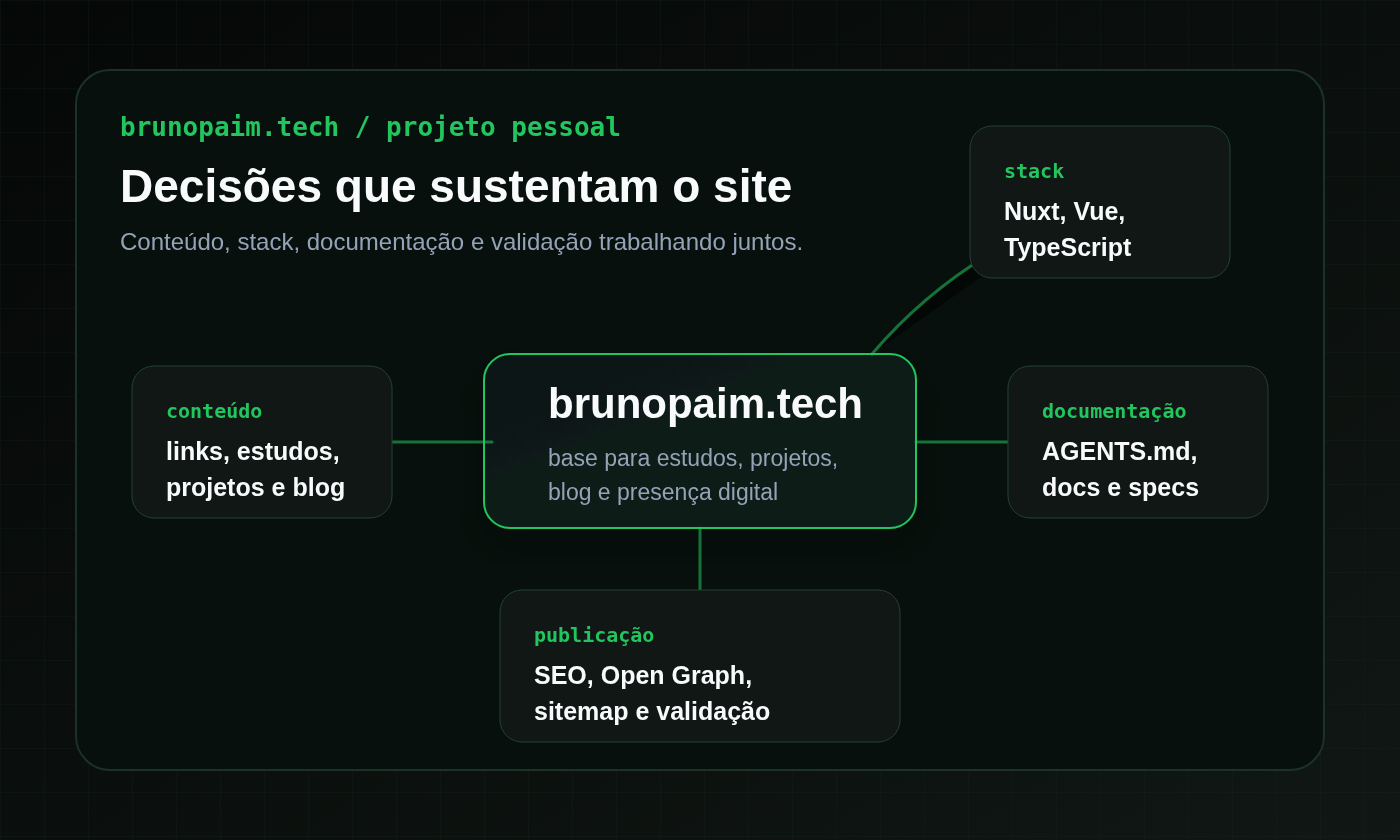
The build involved decisions about stack, content structure, visual identity, blog, SEO, Open Graph images, AI First documentation, and a spec flow before relevant changes. None of that started as a closed methodology. It emerged as the project needed more clarity.
Problem or question
The question that guided much of this process was: does a personal website need to be only a showcase?
In my case, the answer was no.
I did not want brunopaim.tech to look like a software house, a sales page, or a service promise. It also did not make sense to create a portfolio full of metrics, cases, or information that should not be there.
The site needed another role:
- organize my digital presence;
- record studies and practical lessons;
- centralize projects and links;
- support content creation for the blog, LinkedIn, Instagram, and YouTube;
- show technical evolution without inventing a narrative;
- work as a safer base for working with AI and agents.
That changes how the site is built.
Instead of thinking only about layout, I had to think about positioning, tone of voice, boundaries, documentation, and validation. The challenge was not only "how do I make this look good?". It was "how do I keep the site coherent as it grows?".
Process tested
The process started with the technical base.
The current stack uses Nuxt 3, Vue 3, TypeScript, and Tailwind CSS. This combination makes sense for the current stage because it supports a static application, public routes, posts rendered in the initial HTML, page-level SEO, Open Graph, and static generation.
Before that, the base had already gone through a first functional version with Vue, Vite, TypeScript, and Tailwind. That version helped get the site out of the idea stage, organize the main pages, and create reusable components. Later, the migration to Nuxt made sense because the blog and public pages needed a better base for SEO and social previews.
That technical evolution came together with a scope decision: no backend, database, CMS, or admin area in this phase.
That may sound like a limitation, but for now it is an advantage. The content still fits well in local files, posts follow their own editorial flow, and complexity stays under control. Before thinking about a CMS, it made more sense to organize the process.
Another important front was visual identity.
The site uses a dark, technical, and professional aesthetic, with green as the highlight color. The intention is not to create a gamer, neon, or exaggerated look. The interface needs to feel modern, but still accessible and restrained. That applies to the home page, internal pages, cards, blog, editorial images, and social previews.
The third point was documentation.
AGENTS.md, the files in docs/, and the specs in specs/ became the project memory. They record what the site is, what it should not be, which information is fixed, which terms fit the positioning, and which changes require more care.
This documentation also helps when using AI.
When a task comes with context, constraints, and clear criteria, the answer tends to be more useful. When the agent knows the site should not sell services directly, should not look like a software house, should not invent metrics, and needs to preserve sensitive information, it becomes easier to keep the project aligned.
That is why the content flow also gained stages:
- rough idea;
- strategic outline;
- draft article;
- repurposed content;
- manual approval;
- site implementation;
- final review.
This process does not exist to make the blog bureaucratic. It exists to prevent a loose text from becoming a publication before it has a thesis, tone, context, and validation.
Practical example
A simple example is the creation of blog posts.
Before publishing an article, I try to go through an outline. The outline defines the main thesis, audience, editorial angle, what needs to be included, what stays out of scope, internal links, the planned Open Graph image, and possible content repurposing.
That changes the conversation with AI and also changes the human review afterward.
If I only ask "write a post about my personal website", the answer can go in a generic direction. It may sound like agency copy, sell website creation, exaggerate results, or invent behind-the-scenes details that never happened.
When the outline makes it clear that the focus is process, learning, documentation, and safe decisions from the project itself, the text starts from a more controlled space.
The same applies to technical changes.
If the task is editing a post, creating an OG image, or changing a public page, documentation helps remember that the site has patterns: reusable components, structured data in local files, SEO care, validation with build and static generation when applicable, and consistency between Portuguese and English.
That is the most important point to me: good documentation is not only useful to explain the project later. It improves decisions during the build.
Lessons learned
- A personal website also needs positioning. Without it, it is easy to fall into generic text, visuals without direction, or overly commercial language.
- The stack matters, but it does not solve the project by itself. Nuxt, Vue, TypeScript, and Tailwind help, but the value is in what the structure allows me to organize.
- Content needs process. Idea, outline, draft, approval, and implementation are different stages.
- Documentation reduces ambiguity. It helps AI, but it also helps the person reviewing the answer.
- Small specs prevent changes from becoming larger than necessary. Not every task needs a spec, but relevant changes work better with a goal, scope, and criteria.
- SEO does not need to be artificial. Title, description, canonical, Open Graph, and structured data help when they are connected to real content.
- The blog can become a reusable learning base. A well-planned post can become a LinkedIn summary, a carousel, a short video script, and future studies.
- The project is still evolving. The current structure does not need to be final to be useful now.
Limits and caveats
This post is not a complete tutorial on how to create a personal website.
It is also not an argument that every project needs to start with extensive documentation, specs, and a detailed editorial flow. In many cases, starting simple is the best path. The key is noticing when a project stops being only a screen and starts becoming a base for content, learning, and digital presence.
Another limit is that brunopaim.tech is still evolving. Some decisions may change as the blog grows, new pages make sense, or the publishing flow needs adjustments.
For now, it makes sense to keep a static base, without a backend or CMS. That keeps the project simpler, traceable, and easier to validate. If that structure limits the content too much one day, then the conversation changes.
It is also worth reinforcing: using AI in the process does not remove human review. AI helps organize ideas, create variations, review structure, and speed up parts of the work. But the criteria for what enters the site remain mine.
Conclusion
Building brunopaim.tech has been less about creating a finished showcase and more about organizing a base that I can evolve with clarity.
The site brings together links, studies, projects, a blog, and behind-the-scenes notes, but it also records a way of working: with documentation, scope, review, editorial care, and careful AI use.
The main lesson so far is that a personal project can be small and still have process. It does not need to become bureaucracy. It only needs enough context to remain coherent as new ideas, posts, and changes start appearing.